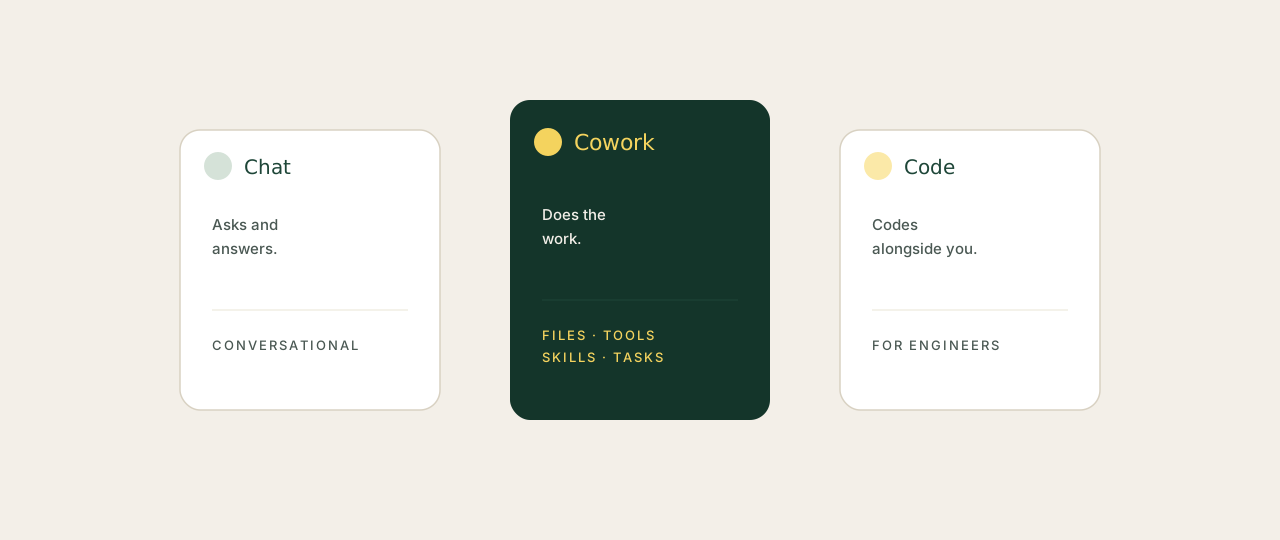
Every founder I work with arrives with the same confusion. They have used ChatGPT or Claude Chat. They have heard about agents. Someone mentioned Claude Code. They are not sure which one to open in the morning, and they are pretty sure the answer is "all three" without knowing what each one does.
The good news: it is not complicated once you see it. The three products share the same brain. What changes is what that brain has access to and how it works on your behalf.
The three Claudes, side by side
Claude Chat
Best for: answering questions, drafting copy, thinking through problems out loud. The conversational front door.
Where it lives: claude.ai in your browser, or the desktop app.
What it can't do: read your files, run commands, or take action without you copy-pasting.
Claude Cowork
Best for: doing the actual work: reading files, producing documents, running multi-step tasks, working across your tools.
Where it lives: a mode inside the Claude desktop app.
What's different: file access, a sandboxed code environment, connectors to your tools, and persistent skills.
Claude Code
Best for: writing, editing and shipping code. Designed for engineers in a terminal.
Where it lives: a CLI you run from the command line.
What it's not: a general-purpose assistant. If you do not write code, you do not need it.
The simplest way to keep them straight: Chat answers, Cowork does, Code codes. Most non-technical founders need Chat and Cowork. Code only matters if you are shipping software yourself, or pairing with an engineer.
When you actually need Cowork
If you spend your week on any of the work below, Cowork pays for itself within a few hours.
- Reading and synthesising piles of documents (board packs, customer interviews, contracts, research)
- Producing repeatable outputs (weekly reports, board updates, hiring scorecards, briefs)
- Running multi-step workflows you would otherwise hand to an EA
- Cleaning up files, folders, exports and other admin friction
- Drafting and replying to recurring email types in your voice
If your AI use is mostly one-off questions or quick rewrites, Claude Chat is fine and Cowork is overkill. If you are repeating yourself every week, you have already paid for the setup time many times over.
Setting up Claude Cowork, step by step
Around 30 minutes, no coding, one folder choice and a few connectors. That's the whole thing.
Step 1: Check your subscription
Cowork lives in the Claude desktop app and requires a paid Claude plan (Pro or above). If you only have free Claude.ai, upgrade first. Pricing details are on Anthropic's site, and there is no separate Cowork subscription beyond the Claude one.
Step 2: Download the desktop app
Get the Claude desktop app from claude.ai/download. Mac and Windows are both supported. Sign in with the same account you use for Claude.ai.
Step 3: Switch into Cowork mode
Open the app, start a new chat, and find the mode selector in the chat composer. Switch from the default conversational mode into Cowork. The chat panel stays the same; what changes is what Claude can do behind it.
Step 4: Pick a folder for Cowork to work in
Cowork can read and write files, but only inside folders you explicitly select. Point it at a working folder on your computer (most founders create a single cowork-workspace folder and put working files inside it). You can skip this step and use a temporary workspace, but persistent work is much easier when files survive the session.
Step 5: Connect your tools
Open Settings → Connectors → Browse. Add the tools you use day to day. The most useful first connectors for a founder:
- Gmail (read, search, draft and send on your behalf)
- Google Calendar (call prep, scheduling, briefings)
- Google Drive or Notion (read and write docs)
- Slack (read updates and post messages)
- Stripe, HubSpot or your CRM (real-time business data)
Connect three to start. Once Cowork has live data and the right permissions, the quality of what it produces jumps significantly.
Step 6: Try your first task
Start small to feel the difference. Three good first tasks:
- Tidy a messy folder. Point Cowork at your Downloads folder and ask it to rename, group and sort files. Five minutes, immediately useful.
- Synthesise a stack of documents. Drop ten board updates, customer interviews or research PDFs into a folder. Ask for a structured one-page summary of the themes.
- Daily morning brief. Ask Cowork to read your calendar for tomorrow, your unread Slack DMs, and your priority list, and write you a five-bullet brief for the morning.
Step 7: Set up anything recurring as a scheduled task
Once a Cowork workflow is working, save it as a scheduled task so it runs without you. Daily morning briefs, weekly investor updates, end-of-month financial summaries: all candidates. Settings let you choose how often the task runs and where outputs go.
about-me.md and brand-voice.md file inside your workspace folder. Every Cowork session can read them and immediately know who you are, how you talk and what you care about.
FAQ
Do I need to be technical to use Claude Cowork?
No. If you can write a clear instruction, you can use Cowork. The setup above takes about 30 minutes and uses no code at any point.
Does Claude Cowork cost extra on top of Claude?
No. Cowork is included with a paid Claude plan (Pro or above). You download the desktop app, sign in with your existing account, and switch modes. Check Anthropic's site for current pricing.
Can Cowork access the internet?
Yes, when the task calls for it. Cowork can browse the web to research a topic, find current information or fetch a specific page. You can also restrict what it accesses through the instructions you give it.
Is Cowork safe to use with my files?
Cowork only reads and writes inside folders you explicitly point it to. It does not browse your computer independently. As with any AI output, review files before sending them externally and never share credentials, API keys or sensitive data in instructions.
What's the difference between Claude Cowork and Claude Code in plain English?
Cowork is the desktop app for general professional work: documents, research, automation, file handling. Code is a CLI for developers writing software in their terminal. Same brain, different surface, different audience. Founders almost always want Cowork.
How quickly does it become useful?
Most founders see value in their first session, full leverage after about a week of consistent use. The unlock is in your first three Cowork "skills": morning brief, document synthesis, weekly report.
Chat answers. Cowork does. Code codes. The set-up takes 30 minutes, no engineer required, no separate subscription. Most of the founders who say AI hasn't lived up to the hype have only been using Chat. Open Cowork, point it at a folder, connect Gmail, and the picture shifts inside an afternoon.