Out of the box, Claude is a generalist. It can do most things competently and a few things brilliantly. But ask it to write a Word doc with proper letterhead, build a pitch deck, or fill in a PDF form, and the default Claude is a coin flip. Sometimes great. Sometimes a mess that you wouldn't send to anyone.
Skills fix this. They are pre-built behaviours that flip Claude from "smart generalist" into "competent specialist" the moment a task matches.
What a Skill actually is
Strip away the marketing language. A Skill is a folder. Inside the folder lives a SKILL.md file with instructions, plus optional supporting files (templates, reference data, helper scripts). When Claude starts a task and detects keywords that match a Skill description, it reads the SKILL.md before doing anything else.
That single design choice is doing a lot of work. It means Claude does not stuff every possible behaviour into its base context. The Skill is loaded only when it is relevant. So you can have hundreds of Skills installed and Claude stays fast.
Three things make Skills powerful:
- Composable. Multiple Skills can fire on the same task. Asking for a financial model in a branded slide? The xlsx Skill builds the numbers, the pptx Skill formats the deck.
- Quiet. You don't tell Claude to use them. Claude figures out which Skill applies based on the description.
- Updatable. When a Skill author improves the SKILL.md, your Claude gets the upgrade automatically.
Why default Claude isn't enough
The honest version: training data is a starting point, not a specialist. Claude has read millions of Word documents but it has not been trained to ship one with the exact margins, fonts, headers, and tracked-changes behaviour that a corporate doc needs. The base model knows the shape. The Skill knows the conventions.
Same for spreadsheets. Same for PDF forms. Same for slide decks.
Default Claude is the consultant who knows the field. The Skill is the senior associate who has shipped 200 of them.
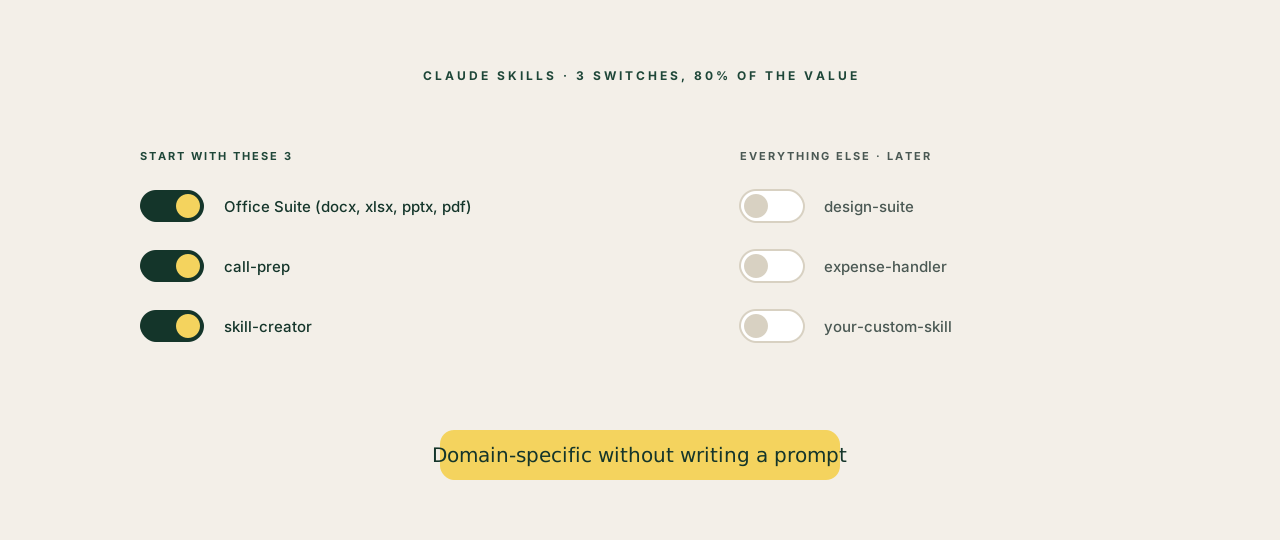
The three Skills every founder should turn on first
You can install dozens. You only need three to feel the difference.
1. The Office Suite (docx, xlsx, pptx, pdf). If your work involves any of these file types ever, this is the unlock. Claude stops producing files that look like they were typed by a robot, and starts producing files that look like they came from your team. Real headers, real formatting, real chart styles, real form fields.
2. The call-prep Skill. Hands Claude a workflow: pull the email history, the Granola transcripts, the Stripe records and the LinkedIn for the person you're meeting, then write you a structured briefing. One trigger ("prep my 3pm with Sarah"), one output, no nine-step prompt.
3. The skill-creator Skill. The meta one. Claude helps you write your own Skills, the right way, in your voice. Once you have this installed, every recurring workflow you do becomes a candidate for becoming a permanent Skill.
How to know when to make your own
The trigger is simple. If you find yourself typing the same setup paragraph into Claude more than three times in a week, that paragraph wants to be a Skill.
Examples from real founders:
- "Write in our brand voice: direct, British, no jargon, never use these banned words." That's a Skill.
- "Pull the financial summary from our Stripe, the runway model from the spreadsheet, and turn it into the standard board-update format." That's a Skill.
- "When I send you a meeting transcript, extract decisions, action items by owner, and risks. Format like this." That's a Skill.
The pattern: anything that has a repeatable input, a repeatable output, and your specific conventions in between. The Skill captures the conventions so you stop typing them.
The 5-minute setup
To turn on Skills in Claude:
- Open Claude Cowork (or claude.ai → Settings → Capabilities)
- Find the Skills section
- Toggle on the Office Suite, call-prep, and skill-creator
- Restart Claude. The Skills are now in scope.
You don't need to do anything else. Next time you ask for a Word document, the docx Skill activates. Next time you say "prep me for my 3pm", call-prep activates.
The honest limit
Skills are not a magic upgrade for bad prompts. If you ask vaguely, Skills don't save you. They are a quality multiplier on top of a clear request, not a substitute for one.
Get the request right first. Then let Skills handle the conventions.